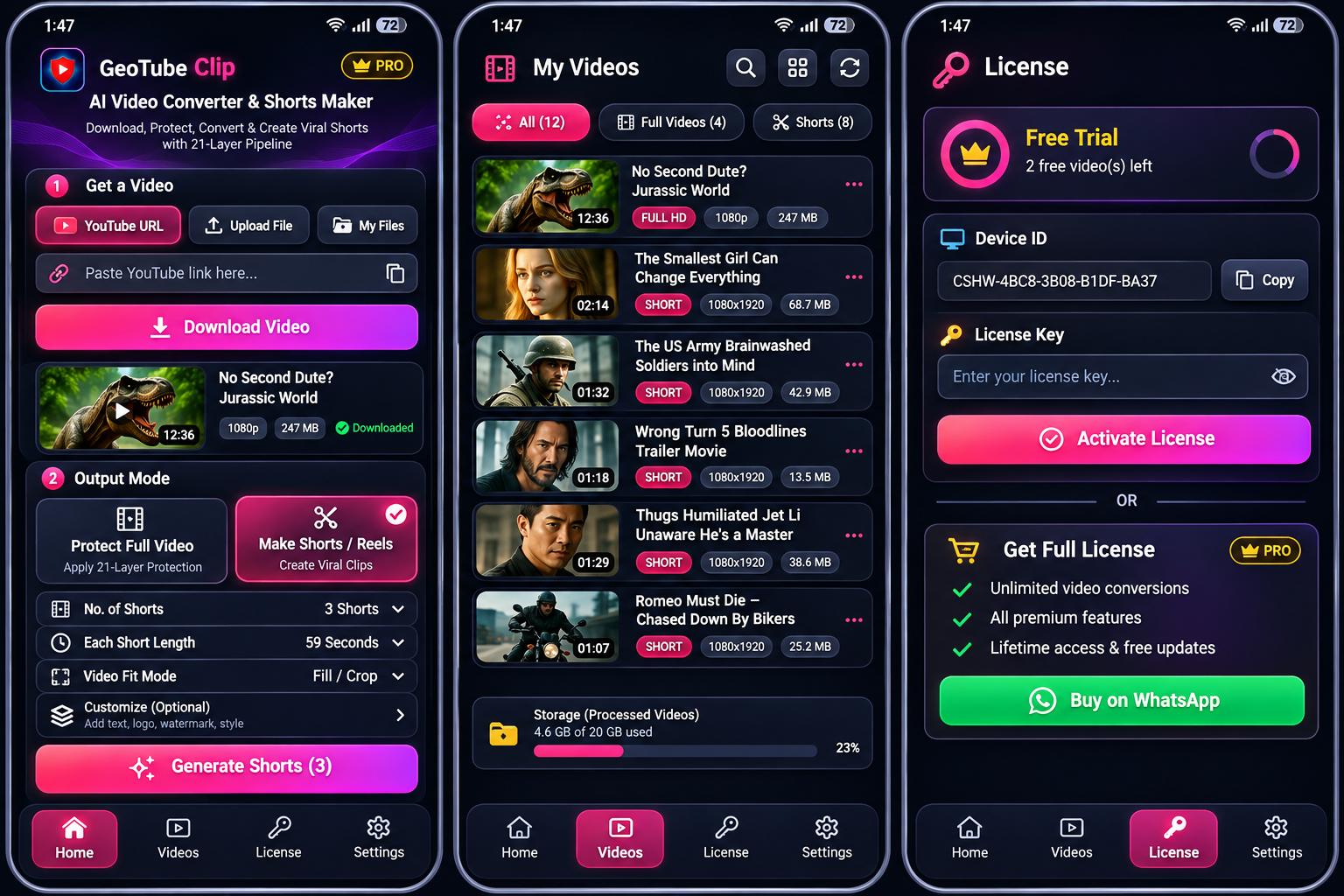
GeoTube Clip Android — Single Device License
Price range: $ 9.99 through $ 99.00
🎬 **GeoTube Clip Android – Your Pocket Video Studio!**
Create amazing short-form videos with **GeoTube Clip Android**, an easy-to-use Long Video to Shorts Converter for content creators. Turn long videos into YouTube Shorts, TikTok videos, Instagram Reels, and Facebook Reels directly from your Android phone.
✨ **Powerful Features:**
– 🎯 Smart video clipping – Create multiple short clips.
– 📱 Vertical 9:16 video export.
– 💬 Burned-in captions for your videos.
– 🛡️ 21-layer protection pipeline.
– 🔗 Supported YouTube video URL conversion.
– 🎥 Convert videos from your phone gallery.
– ✂️ Built-in video trimmer.
– 🚀 No PC or professional editing skills required.
🎁 **2 Free Trial Conversions Included**
📱 Licence: 1 Android Device
🔥 Plans from **$9.99**
✅ One-time payment for your chosen plan – no auto-renewal.
📩 APK download link and licence key delivered by email after payment confirmation.
Description
📦 Choose Your Plan (select a plan above before adding to cart):
⏳ 1 Month — 🎬 25 Videos
⏳ 3 Months — 🎬 70 Videos
⏳ 6 Months — 🎬 150 Videos
⏳ 12 Months — 🎬 300 Videos
♾️ Unlimited Lifetime — 🎬 Unlimited Videos
📱 Runs on 1 Android device
💳 One-time payment for the plan you choose — no auto-renewal, no recurring charges. When your plan ends, simply buy again to renew.
🎁 Every plan includes all features and 2 free trial conversions.
🎬 GeoTube Clip Android – Your Complete Video Studio
GeoTube Clip Android is an easy-to-use Android video clipping app that helps content creators turn long videos into engaging short-form content. Create YouTube Shorts, TikTok videos, Instagram Reels, and Facebook Reels directly from your Android smartphone without needing a PC or professional video editing skills.
Looking for a reliable Long Video to Shorts Converter? GeoTube Clip makes video conversion simple. Paste a supported YouTube video URL or select a video from your phone gallery, start the conversion process, and prepare vertical 9:16 clips with burned-in captions.
Whether you are a YouTube creator, TikTok creator, Instagram influencer, or social media marketer, GeoTube Clip provides a convenient mobile video creation workflow.
🚀 Create YouTube Shorts, TikToks & Instagram Reels
Long videos often contain useful moments that can be turned into shorter social media content. GeoTube Clip helps you create multiple short clips from longer videos and prepare them for popular video platforms.
- ▶️ YouTube Shorts
- 🎵 TikTok Videos
- 📸 Instagram Reels
- 📘 Facebook Reels
- 📱 Other vertical video platforms
⭐ Powerful Features of GeoTube Clip Android
🎯 Smart Video Clipping
Convert long videos into multiple shorter clips with the smart clipping feature. Prepare short-form content more conveniently without manually creating every clip from scratch.
📱 Vertical 9:16 Video Export
Create vertical videos in the 9:16 aspect ratio, suitable for YouTube Shorts, TikTok, Instagram Reels, and Facebook Reels.
💬 Burned-In Captions
Add captions directly to exported videos. Burned-in subtitles remain visible during playback without requiring viewers to enable separate subtitle settings.
🛡️ 21-Layer Protection Pipeline
GeoTube Clip includes a 21-layer protection pipeline as part of its video processing workflow. Your clips pass through multiple processing stages before the final output is prepared.
🔗 YouTube Video URL Support
Paste a supported YouTube video URL directly into the application to start your conversion workflow. Always ensure you have permission to download and reuse the video content.
🎥 Gallery Video Conversion
Select videos already saved on your Android smartphone and use them to create shorter clips. You can work with your existing video files directly from your phone.
✂️ Built-in Video Trimmer
Adjust your converted clips using the built-in video trimmer. Select the exact section and duration you need before exporting your video.
🚀 No PC or Editing Skills Required
GeoTube Clip is designed for Android users who want a straightforward video creation experience. Select a video, convert it, trim it if needed, and prepare your content for social media.
⚙️ How to Use GeoTube Clip Android
- 📥 Download: Receive your Android APK download link by email after payment confirmation.
- 📲 Install: Install the APK on your compatible Android smartphone.
- 🔑 Activate: Enter the licence key received by email. Activation is required only once.
- 🎬 Select Video: Paste a supported YouTube URL or choose a video from your gallery.
- ⚡ Convert: Start processing your video and prepare shorter clips.
- ✂️ Trim: Adjust the clip duration with the built-in video trimmer.
- 📤 Export: Prepare your vertical videos for your preferred social media platform.
🎁 What’s Included in Your Purchase?
- ✅ GeoTube Clip Android application (APK).
- 📱 Full version with all listed features.
- 🔑 Single-device licence for one Android smartphone.
- 🎯 Smart video clipping and conversion.
- 📐 Vertical 9:16 video export.
- 💬 Burned-in captions.
- 🛡️ 21-layer protection pipeline.
- ✂️ Built-in video trimmer.
- 🎁 Two free trial conversions.
- 💳 One-time payment for the plan you choose — no auto-renewal, nothing is charged automatically.
💰 Special Launch Offer – Plans from $9.99
Get your single-device licence at our special launch price.
- 🔥 Plans from $9.99 — pick your plan above
- 📱 Licence: 1 Android Device
- 💳 Payment: One-time payment
- 🔄 Auto-renewal: Never — renew only when you choose.
🎁 Try Before You Buy
GeoTube Clip includes two free trial conversions so you can test the app before purchasing your licence. No licence key is required to start the free trial.
📋 Android Device Requirements
- 📱 A compatible Android smartphone.
- 🌐 Internet connection for licence activation and downloading videos.
- 💾 Sufficient storage space for video files and exports.
- 📩 A valid email address to receive your APK and licence key.
💳 Payment Methods & Delivery
We offer convenient payment methods for customers in Pakistan and international buyers.
- 🇵🇰 JazzCash: For customers in Pakistan.
- 🌍 Binance: For international customers.
Complete your payment and upload your receipt through our Payment Confirmation page. After payment verification, your GeoTube Clip APK download link and licence key will be sent to your registered email address.
🌐 Explore More Products
Looking for more useful digital products and online services? Visit our website to explore more products and services.
👉 Visit GeoSharing Store – Explore More Products
📞 Need Help? Contact Our Support Team
Have questions about payment, installation, downloading, or licence activation? Our support team is available on WhatsApp.
📱 WhatsApp Support: +92 344 5266661
🛍️ Explore GeoTube Clip
Ready to create engaging short videos? Get your own GeoTube Clip Single Device License and start converting long videos into YouTube Shorts, TikToks, and Instagram Reels directly from your Android phone.
👉 View GeoTube Clip – Single Device License
🎬 Start Creating Short Videos Today!
Make video creation easier with GeoTube Clip Android. Turn long videos into shorter clips, create vertical 9:16 content, add burned-in captions, and prepare videos for your favourite social media platforms directly from your smartphone.
🔥 Plans start from just $9.99 and start creating short-form videos without a PC!
Additional information
| Plan | 1 Month — 25 Videos, 3 Months — 70 Videos, 6 Months — 150 Videos, 12 Months — 300 Videos, Unlimited Lifetime |
|---|
2 reviews for GeoTube Clip Android — Single Device License
Related products
-
Sale!
GeoTube Clip Pro — 3 Devices License
Price range: $ 39.00 through $ 299.00 Select options This product has multiple variants. The options may be chosen on the product page -
Sale!
GeoTube Clip — Single Device License
Price range: $ 19.99 through $ 199.00 Select options This product has multiple variants. The options may be chosen on the product page -
Sale!
GeoTube Clip Android Pro — 3 Devices License
Price range: $ 19.99 through $ 199.00 Select options This product has multiple variants. The options may be chosen on the product page
Hamza Abbas (verified owner) –
I recently got GeoTube Clips Android, and honestly, it’s the best! 🔥 It has made my work so much easier. Smooth, powerful, and super convenient. Absolutely superb experience! Highly recommended! ❤️
GeoTube Clip (verified owner) –
Thank you so much for your purchase and for trusting GeoTube Clips! ❤️ We truly appreciate your 5-star rating and kind feedback. Your support means a lot to us. Enjoy using GeoTube Clips Android! 😊
ghulam sarwar –
It’s a great software I am very happy to be a part of you my long video converted to reels & shorts quickly.
Thanks
GeoTube Clip (verified owner) –
Thank you so much for your wonderful 5-star review! ⭐⭐⭐⭐⭐
We’re truly happy to have you as part of our GeoTube Clip family. ❤️ It means a lot to know that our software is making your work easier and helping you convert long videos into Reels and Shorts quickly.
We sincerely appreciate your trust and support. Your satisfaction motivates us to keep improving and providing the best experience.
Thank you for choosing GeoTube Clip! 🙏❤️